


Chat Is Not the Product
By RJ Assaly on February 18, 2026
There's a quiet assumption running through most AI product design right now: the chat interface is the destination. You type, the system responds, and that's the interaction model. Every new AI tool seems to launch with a text box and a blinking cursor.
In consumer contexts, that's often fine. But in professional domains — particularly finance — this assumption breaks down fast. And the way it breaks is instructive.
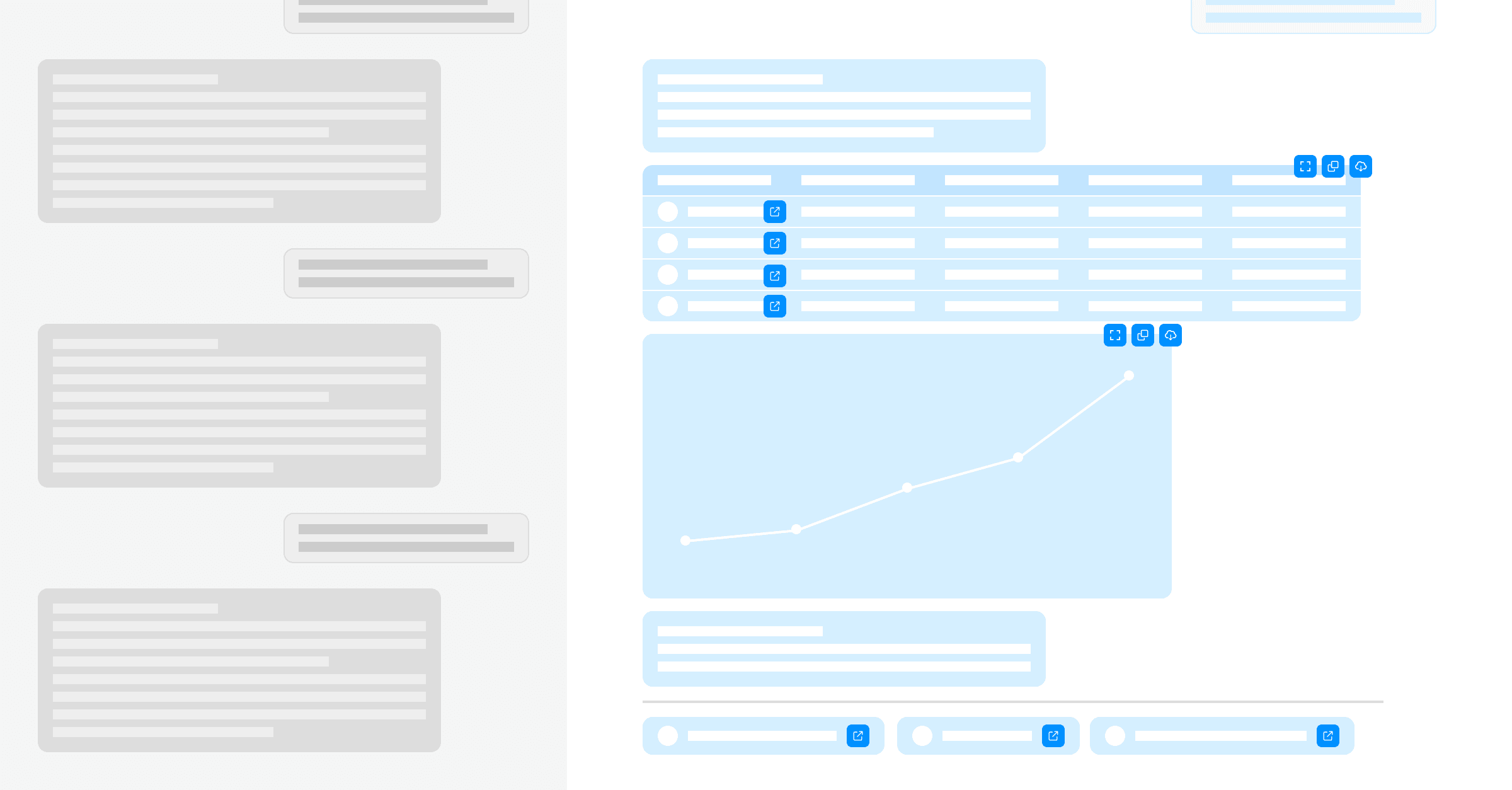 The conventional chat model is linear. We treat natural language as an on-ramp into rich, interactive content.
We've Been Doing This for a While
We've been building AI systems for investment professionals at Reflexivity since well before the current wave of chat-first products. Before anyone was talking about "AI copilots," we were using language models to do something unglamorous but important: translate quantitative outputs into natural language.
Our system would run a statistical analysis — say, detect that McDonald's had an unusual volume spike, and that historically, when this pattern occurs, Chipotle tends to move in a correlated way within a specific window — and then verbalize that for a portfolio manager who isn't a quant: "You should pay attention to Chipotle. Here's why, here's the evidence, and here's the back-test." The statistical rigor was there underneath. The language model made it accessible.
When GPT-3.5 landed, we extended this in the other direction: letting users express intent in natural language and get rich, structured content back. Not chat responses. Content — tables, charts, sourced analysis, and interactive visualizations.
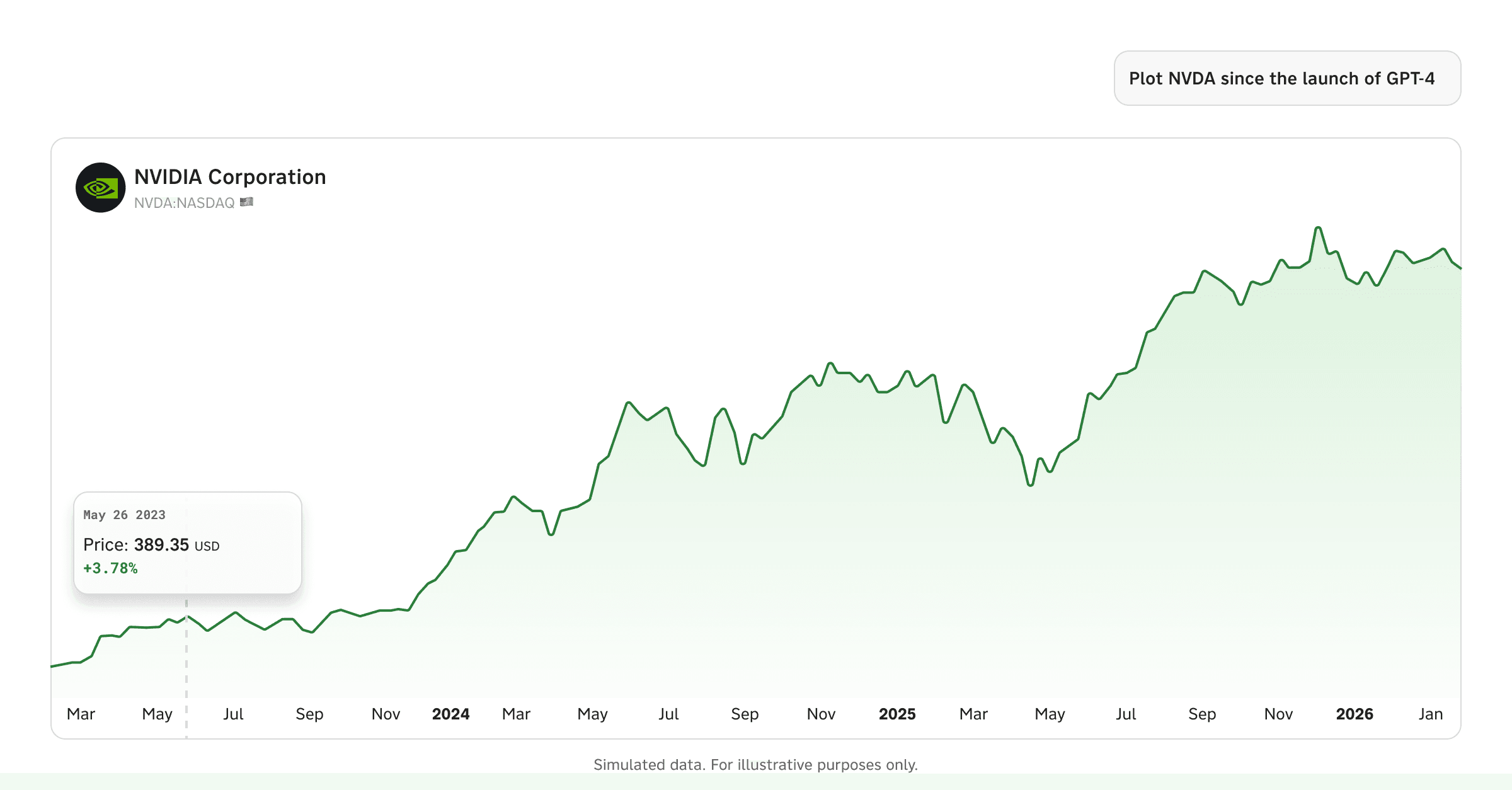 An early example of what we mean by "content, not chat" – a query returning structured, workable output.
That distinction matters more than it sounds.
What "Chat-First" Gets Wrong
Here's the thing about a portfolio manager's workflow: it's not a conversation. It's an investigation. The PM has a thesis, or a half-formed question, or a hunch… and they need to pull on threads, compare data, check sources, manipulate views, and build conviction. That process is inherently multi-modal. Some steps are best expressed in language. Others are best executed with a click.
The problem with chat-first design isn't that chat is bad. It's that chat becomes a bottleneck the moment you need to do something with what you got back. Sorting a table by market cap. Toggling a chart's time horizon. Filtering search results by document type. Drilling into a specific company from a comparative analysis. These are all actions that take two seconds with a mouse and fifteen seconds to articulate in natural language — assuming the system even interprets your instruction correctly.
And yet, a remarkable number of AI products force users to stay in the chat lane. Want to re-sort that table? Type it. Want to zoom into a chart? Type it. Want to see the underlying passage that supports a claim? Type it.
Nobody who has actually used a Bloomberg terminal would design a system this way.
The Pattern: Language for Intent, Interaction for Iteration
The design principle we've arrived at — through years of building this, not through theory — is roughly: natural language is an on-ramp, not a destination.
Language is extraordinarily good at expressing intent. "Show me all the surgical robotics companies and help me understand whether the sector is priced for penetration growth or margin expansion." No form, no dropdown menu, no pre-built screen is going to capture that request as naturally as plain English.
But what comes back shouldn't be a chat message. It should be a thing — a piece of rich, structured content that you can manipulate, interrogate, and build on using the interaction paradigms that professionals already know.
Here's what this looks like in practice.
A Concrete Example: Sector Research
A research analyst asks Reflexivity: "Is the surgical robotics sector currently priced for penetration growth, margin expansion, or technological breakthroughs?"
What comes back isn't a paragraph of text. It's a structured analysis — an executive summary, a valuation metrics comparison table across Intuitive Surgical, Medtronic, J&J, Stryker, and Globus Medical, a revenue growth vs. P/E scatter plot, margin trend charts, and a sourced evidence section breaking down the case for each valuation driver. The system searched 160 documents across 45 companies, synthesized the evidence, and rendered it as something you can actually work with.
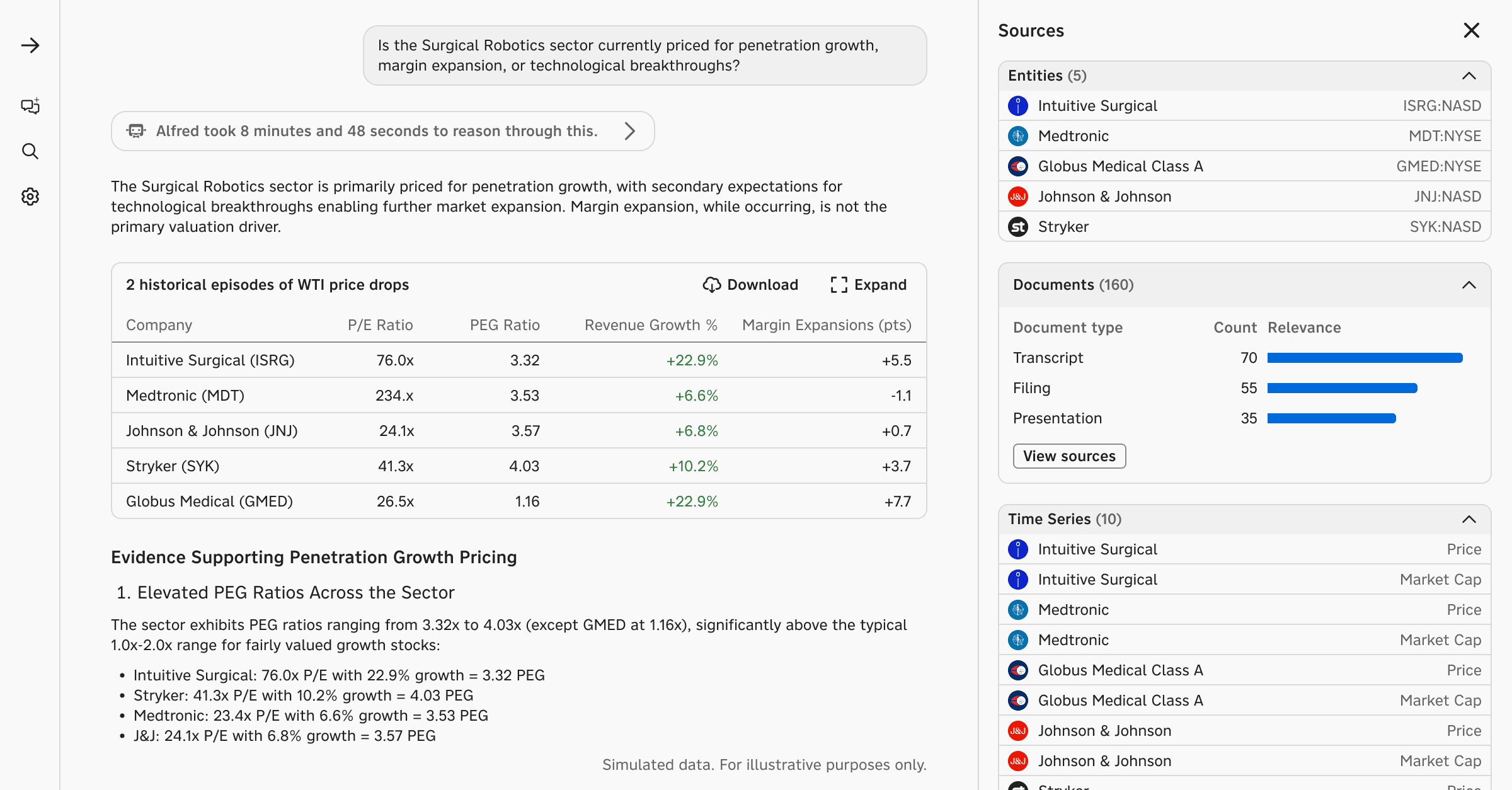 One question. Five entities resolved, 10 time series pulled, 160 documents searched across transcripts, filings, and presentations. What comes back isn't a chat message – it's something you can actually work with.
Now the investigation branches. And this is where the design earns its keep.
Following the Thread: From Analysis to Conviction
The analyst wants to understand Stryker's positioning in more detail. They don't type a follow-up question. They click Stryker in the Sources panel.
A drawer slides open. But this isn't just a stock quote card. It's a full knowledge graph — Stryker's exposure to the Medical Devices theme, its key brands and products, its competitors with live price changes, and other exposures.
From here, the analyst can go deeper in any direction. They click into Stryker's latest earnings. A structured recap appears: Q4 & FY 2025 results, EPS beat of $0.08, revenue beat of $45M, guidance for 8-9.5% organic growth in 2026 — all organized with sections for Market Reaction, KPIs in Focus, Management Commentary, Thematic Focus, Peer Comparison, and Risk Assessment. Not a raw transcript. A synthesized, navigable document.
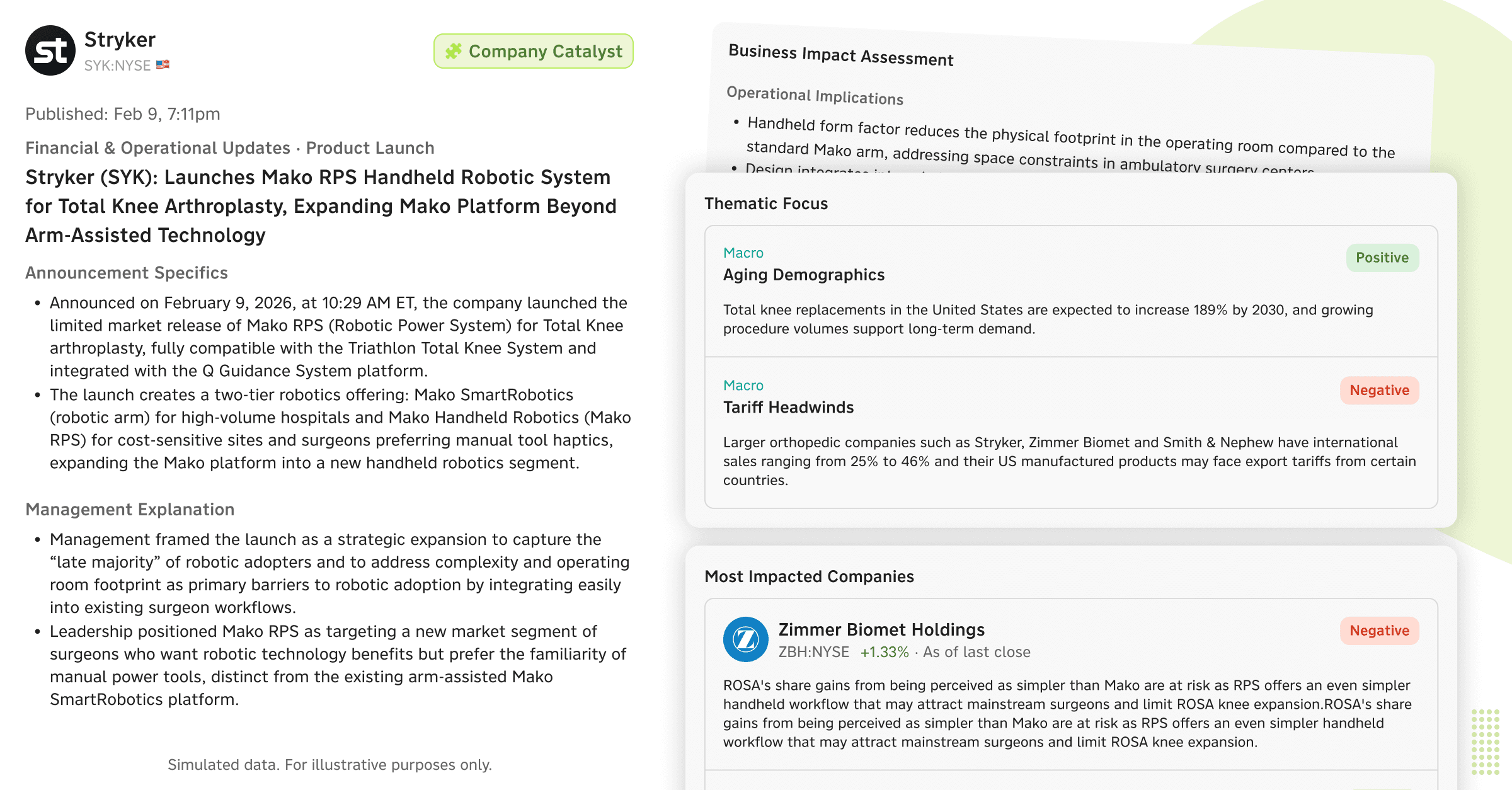 The analyst clicked into Stryker from the analysis. No follow-up prompt needed – just a structured, navigable view.
Or they notice a recent catalyst. Stryker just launched Mako RPS — a handheld robotic system for total knee arthroplasty. The system has already generated a business impact assessment: operational implications, competitive effects (a direct strike against Smith & Nephew's CORI system), financial impact analysis, and a sentiment-tagged view of the most impacted companies — Zimmer Biomet (negative), Smith & Nephew (negative), J&J (neutral), Enovis (negative), Intuitive Surgical (neutral).
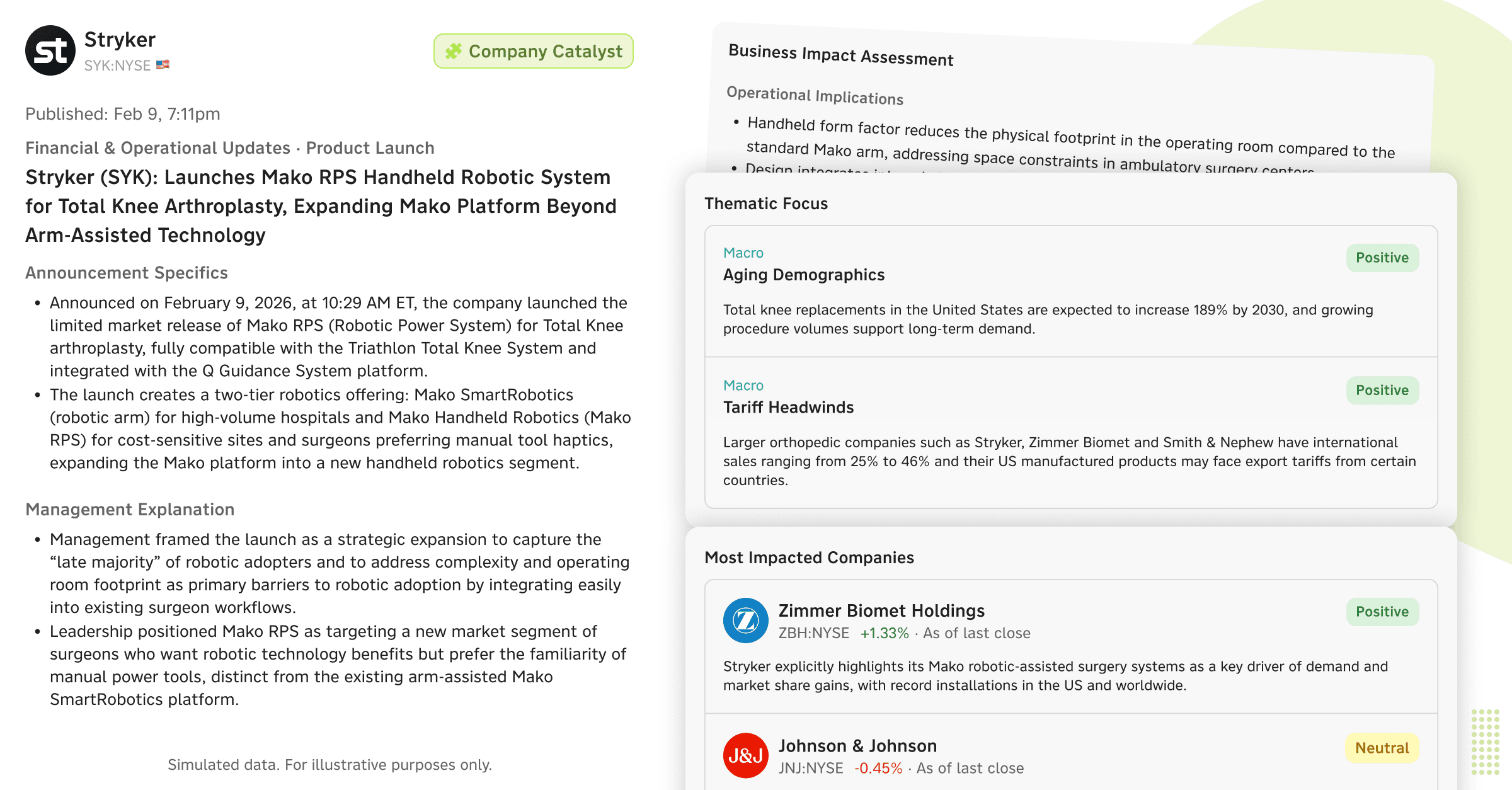
A product launch detected and assessed automatically – competitive impact, sentiment, and price reaction in one view.
The analyst can dive into any of these — click Zimmer Biomet to understand why it's flagged negative, read the thematic focus on Surgical Robotics (positive — "CEO Lobo stated robotics can become the standard of care"), check the Margin Expansion angle, or review the Aging Demographics macro theme.
And if the analyst wants to verify any of this against primary sources? They click "View sources" to open the document search — passages ranked by relevance, filterable and sortable by recency, reporting period, document type, and relevance threshold. Click a passage from a J&J Q3 transcript, and the right pane shows it highlighted in the context of the full document.
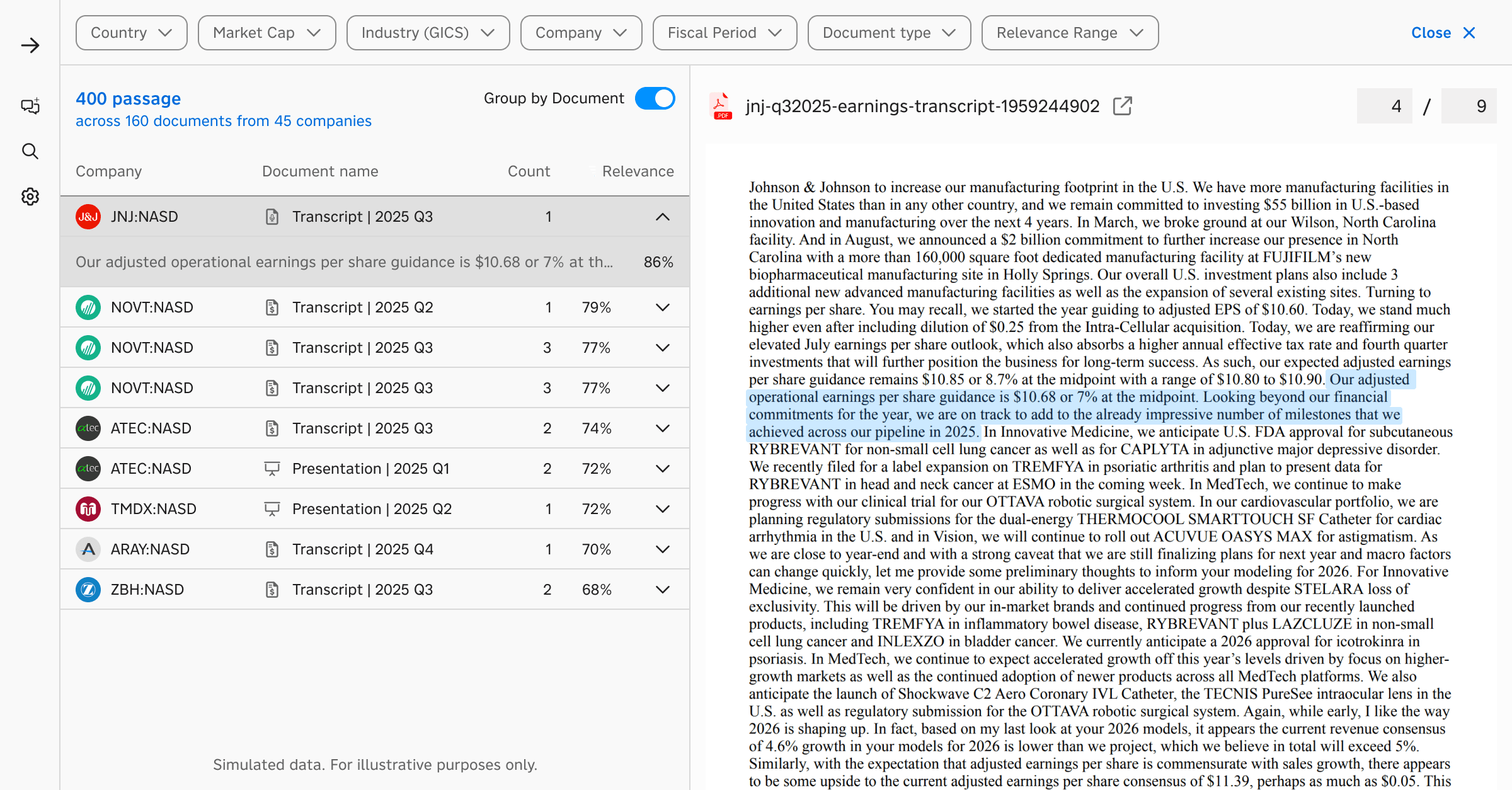 When the analyst wants to verify a claim against primary sources, they click through to passage-level evidence – highlighted in context.
At no point did the analyst re-engage with chat to do any of this. The natural language query established the intent. Everything after that was point-and-click — the interaction model that investment professionals have used for thirty years and that remains, for many tasks, simply faster and more precise than language.
When Language Comes Back
This isn't a story about language being bad and buttons being good. The interesting design space is precisely the interplay between the two.
Sometimes the analyst does come back to chat — but from a position of context. They've been looking at the margin trend chart for ISRG and they want to add Medtronic for comparison. They type: "add MDT margins to this chart." The system knows what "this chart" refers to. It modifies the existing visualization. The analyst could also have done this by clicking "Add data" on the chart itself. Both paths work. The choice is the user's.
Or consider charting more broadly. An analyst asks Reflexivity to chart USDZAR and USDBRL indexed to 100 over the past year. The chart appears. The system has resolved the entities, pulled the time series, and rendered the visualization. Now the analyst wants to add USDCLP. They can type it. Or they can use the data picker in the chart interface, which shows all the related series that were resolved during the conversation, with checkboxes. Whichever is faster in the moment.
The principle isn't 'chat for some things, UI for others.' It's that professional workflows already demand both — and always have. An analyst moves between verbal reasoning and direct manipulation dozens of times in a single research session. That's not a design choice we're enabling. It's an existing pattern we're meeting. The product's job is to make those transitions frictionless, so that working with AI feels like working the way you already work, not adopting a new paradigm.
Why This Is Hard to Build
This sounds obvious when you describe it. But it's genuinely difficult to engineer, and I think that's why so few products do it well.
The core challenge is that natural language outputs and interactive UI components need to share context. When the system generates a structured analysis with embedded charts, tables, and entity references, every one of those elements needs to be a live object — connected to underlying data, capable of receiving interactions, and aware of the broader context of the conversation.
If you build your chat system and your application as separate layers — which is the path of least resistance — you end up with chat responses that are essentially static text with maybe a few rendered widgets. The user can read them, but they can't work with them. The artifacts don't connect back to the platform. There are no on-ramps into deeper exploration, no off-ramps into the user's broader workflow.
Building this properly means the AI system doesn't just generate text. It orchestrates sub-agents that can interact with specific parts of the application — the charting engine, the screener, the document search, the financial data layer. Chat outputs include embedded content that's wired to the same backend as the full-page experiences. Users can "expand" any preview into the full application context without losing their place.
On-Ramps and Off-Ramps
This brings up something that doesn't get enough attention in AI product design: on-ramps and off-ramps.
An on-ramp is how a user enters a workflow. Natural language is a remarkable on-ramp — arguably the best ever designed, because there's no learning curve and no constraints on what you can express.
An off-ramp is how a user takes the output and does something else with it. Downloads it to Excel. Shares it with a colleague. Adds it to a watchlist. Expands it to a full-page view where they can manipulate it with all the controls the platform offers.
Most chat-first AI products are all on-ramp and no off-ramp. You can get into the workflow easily, but you can't take what you got and go somewhere with it. The analysis lives and dies in the chat thread.
For investment professionals, this is a dealbreaker. The output of one piece of analysis is almost always an input to the next. The valuation comparison becomes a slide in a deck. The screening results become a watchlist that gets monitored. The chart becomes an exhibit shared with a PM. The earnings call passage becomes an annotation in a research note.
If you can't get out of the chat — if you can't download, expand, export, share, or integrate — then the AI is generating disposable content. It looks impressive in a demo. It doesn't survive contact with a real workflow.
The Design Thesis
If I had to distill this into a principle, it would be:
Build for the investigation, not the conversation.
A conversation is linear. An investigation branches. The user follows threads, backtracks, compares, cross-references, and builds a view over time. Natural language is a powerful way to start that process and a useful tool to reach for at various points along the way. But it's not the process itself.
The products that will win in professional domains are the ones that understand this — that treat AI as a capability woven through a rich, interactive experience, rather than as a chatbot that occasionally renders a chart.
We started building this way before it was fashionable to have an opinion on it, and the users we work with — PMs and research analysts managing real capital — have made it very clear that this is what working with AI actually feels like when it works. It doesn't feel like a conversation. It feels like having a very capable research partner who sets things up for you and then gets out of the way.